MePlayer Movie Pro Player
3.0
١٠ ألفتنزيل
6.7 ميجابايتالحجم
لقطات الشاشة
عن التطبيق
Learn English while Watching Movies!
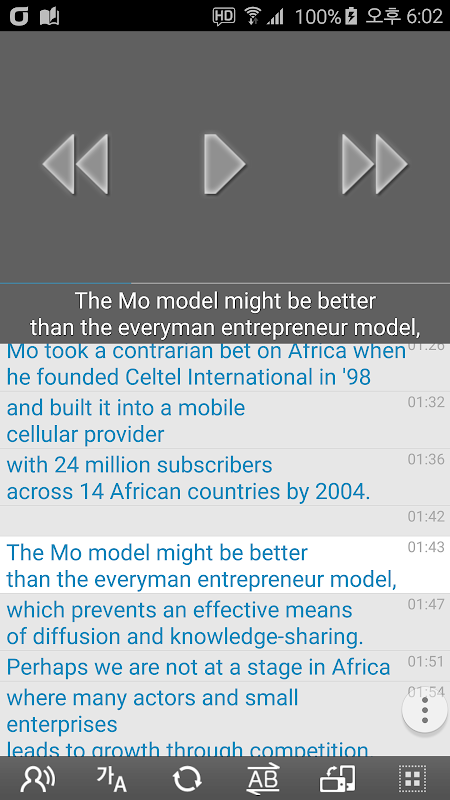
Playing movies in vertical view – watch a movie and read subtitle script at once!
MePlayer Movie is a movie player for studying language/English that supports SMI and SRT subtitles.
The whole subtitle script can be read by scrolling so that you can study English while watching a movie. Words can be found on a dictionary just by clicking at them.
You can study English easily while watching movie with automatic intelligent replay and repeat.
Just like ordinary video players, you can use this program to watch movies conveniently.
==== Before-Playing Settings ====
Put a movie file and its subtitle file in a same folder of the device.
It generally provides MP4 and AVI. The file should have the format that is played in the phone itself.
For flawless playing, we recommend you to encode files to MP4. Subtitles should be in SMI or SRT file formats.
==== Directions for Use ====
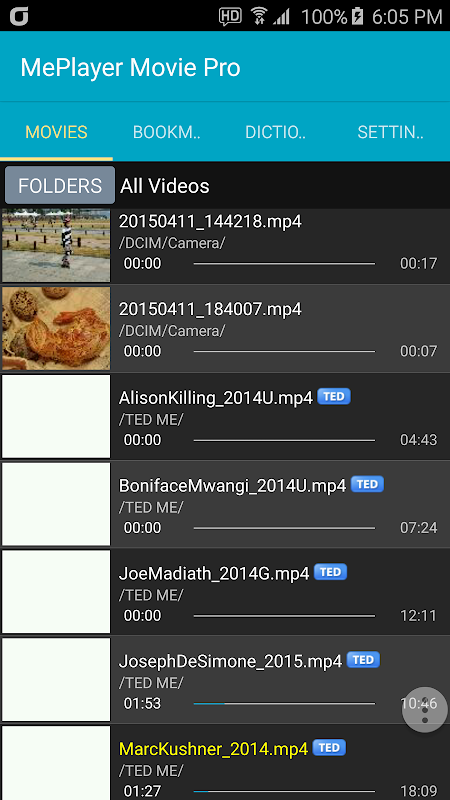
1. Start MePlayer Movie and select the item to play from the playlist.
2. Rewind, Pause/Play and Fast Forward functions: Play the buttons on the displayed movie.
- Rewind: Goes back to the last subtitle starting point.
- Pause/Play: Displays control menu.
- Fast Forward: Goes to the next subtitle starting point.
3. Scroll and find the part you want to see from the subtitle script. Playing will start from that point by touching the part.
4. Replay: Replays the sentence automatically as many times as you chose.
- Intelligent Replay: Automatically decides number of replays considering difficulty of the sentence.
- Section Replay: Provides convenient section replays by sentences.
5. Repeat: Automatically pauses after playing one sentence before playing the next sentence. During the pause, you can read out the subtitle or practice speaking. If the device is set to TTS (Text To Speech), the subtitle will be read by TTS.
6. Subtitle Selection: Korean/English/All subtitles can be selected.
7. Horizontal View <-> Vertical View: The movie can be played in full page by selecting Horizontal View.
8. Sound Play: When you quit movie playing (by clicking Back button), only the sound of the movie can be played like using a MP3 player.
9. Dictionary: By touching the subtitle lightly from the movie image or by long clicking the subtitle from the lower script, the word list will be displayed. When you select a word to search, the word will be shown in the dictionary.
- The list of searched words can be used as the vocabulary list.
- Delete searched words: Long click words to delete.
- TTS pronunciation support: If you can’t hear the sound, set from the phone options.
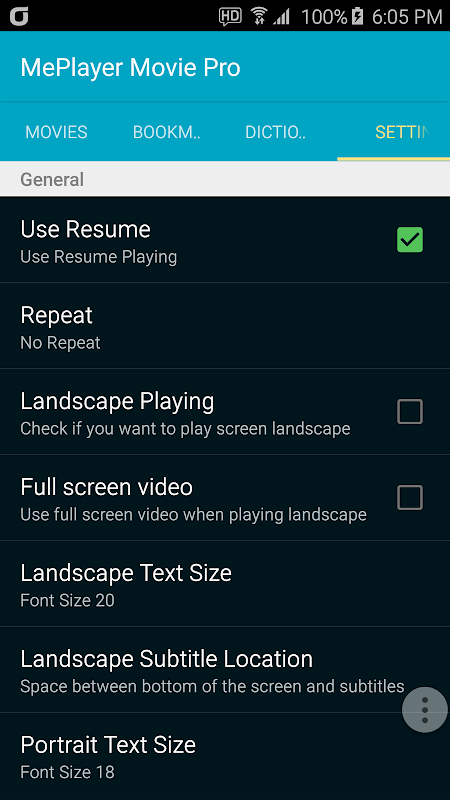
10. Setting: Resume Play, Dictionary Selection, Horizontal View/Vertical View and other details can be set.
11. Control playback speed : above Android6.0, MP4 format
==== Supported Functions ====
. View SMI or SRT subtitles: Automatically scrolled as the movie is played.
. One-touch navigation: Rewind, Play/Pause and Fast Forward by touching movie display area.
. Subtitle Navigation
. Sentence Replay/Intelligent Sentence Replay/Section Replay
. Repeat
. Dictionary function (Provides various languages in the world with Google dictionary.)
. TTS Pronunciation support for subtitle sentences and dictionary
. Searched Word List (Vocabulary List)
. Movies in Horizontal View/Vertical View (Play in Vertical View)
. Play movie in MP3
. Continued Play from the last play stopped point
. Continued Play
. Adjust Subtitle Sync
. Listen to subtitles with TTS
. Section Replay for selected subtitle units
. Supports ColorDict
** This app does NOT have any videos.
تعلم اللغة الإنجليزية أثناء مشاهدة الأفلام!
تشغيل الأفلام في عرض العمودي - مشاهدة الفيلم وقراءة السيناريو الترجمة في وقت واحد!
MePlayer الفيلم هو فيلم لاعب لدراسة اللغة / الإنجليزية التي تدعم SMI وSRT الترجمة.
السيناريو العنوان الفرعي كله يمكن قراءتها من قبل التمرير بحيث يمكنك دراسة اللغة الإنجليزية أثناء مشاهدة فيلم. كلمات يمكن العثور على القاموس فقط عن طريق النقر عليهم.
يمكنك دراسة اللغة الإنجليزية بسهولة أثناء مشاهدة الفيلم مع إعادة الذكية التلقائي وتكرار.
تماما مثل مشغلات الفيديو العادي، يمكنك استخدام هذا البرنامج لمشاهدة الأفلام بشكل ملائم.
==== إعدادات قبل لعب ====
وضع ملف الفيلم وملف الترجمة لها في نفس المجلد من الجهاز.
أنه يوفر عموما MP4 وافي. يجب أن يكون الملف التنسيق الذي لعبت في الهاتف نفسه.
للعب لا تشوبه شائبة، ونحن ننصح لترميز الملفات إلى MP4. يجب أن تكون الترجمة في SMI أو ملف SRT الأشكال.
==== الاتجاهات للاستخدام ====
1. البدء MePlayer السينما وحدد العنصر للعب من قائمة التشغيل.
2. ترجيع، وقفة / تشغيل وظائف سريع إلى الأمام: فتح أزرار على الفيلم المعروض.
- لف: يذهب إلى آخر نقطة انطلاق الترجمة.
- وقفة / اللعب: عرض قائمة التحكم.
- سريعة إلى الأمام: يذهب إلى نقطة البداية الترجمة القادمة.
3. انتقل والعثور على الجزء الذي تريد أن ترى من البرنامج النصي الترجمة. وسوف يبدأ اللعب من تلك النقطة عن طريق لمس جزء.
4. الإعادة: الاعادة الجملة تلقائيا عدة مرات كما اخترت.
- الإعادة الذكية: يقرر تلقائيا عدد من الاعادة النظر صعوبة الحكم.
- القسم الإعادة: يوفر القسم الاعادة المريحة عن طريق الجمل.
5. كرر: مؤقتا تلقائيا بعد ان لعب جملة واحدة قبل أن يلعب الجملة التالية. خلال وقفة، يمكنك تلا الناطقة العنوان الفرعي أو الممارسة. إذا تم ضبط الجهاز لتحويل النص إلى كلام (النص إلى كلام)، سيتم قراءة العنوان الفرعي عن طريق تحويل النص إلى كلام.
6. اختيار العنوان الفرعي: الكورية / الإنجليزية / جميع ترجمات يمكن تحديدها.
7. أفقي عرض <-> عمودي الشخصي: يمكن أن تقوم الفيلم في صفحة كاملة عن طريق اختيار أفقي عرض.
8. لعب الصوت: عند إنهاء فيلم اللعب (عن طريق النقر على زر العودة)، إلا أن الصوت من الفيلم يمكن أن تلعبه مثل استخدام مشغل MP3.
9. قاموس: عن طريق لمس العنوان الفرعي طفيفة من صورة فيلم أو عن طريق النقر طويلة العنوان الفرعي من البرنامج النصي أقل من ذلك، سيتم عرض قائمة الكلمات. عند تحديد كلمة للبحث، وسيتم عرض كلمة في القاموس.
- قائمة الكلمات البحث يمكن أن تستخدم قائمة المفردات.
- حذف كلمات البحث: الكلمات نقرة طويلة لحذف.
- تحويل النص إلى كلام الدعم النطق: إذا لم تتمكن من سماع الصوت، مجموعة من الخيارات الهاتف.
10. إعداد: سير اللعب، قاموس التحديد، أفقي عرض / عمودي عرض وغيرها من التفاصيل يمكن تعيين.
11. مراقبة سرعة القراءة: فوق Android6.0، صيغة MP4
==== وظائف المعتمدة ====
. عرض SMI أو SRT الترجمة: تمريره تلقائيا كما لعبت في الفيلم.
. لمسة واحدة والملاحة: ترجيع، تشغيل / إيقاف مؤقت وسريع إلى الأمام عن طريق لمس منطقة عرض الفيلم.
. العنوان الفرعي للملاحة
. الجملة الإعادة / الذكية الجملة الإعادة / القسم الإعادة
. كرر
. القاموس وظيفة (يوفر مختلف اللغات في العالم مع قاموس جوجل).
. دعم تحويل النص إلى كلام النطق على عقوبات الترجمة والقاموس
. قائمة الكلمات البحث (قائمة المفردات)
. أفلام في أفقي عرض / عمودي عرض (اللعب في عمودي عرض)
. تشغيل الفيلم في MP3
. واصل اللعب من مسرحية الماضي نقطة توقف
. واصل اللعب
. ضبط الترجمة مزامنة
. الاستماع إلى الترجمة مع تحويل النص إلى كلام
. قسم الإعادة للوحدات الترجمة المختارة
. يدعم ColorDict
** هذا التطبيق ليس لديه أي أشرطة الفيديو.
معلومات إضافية
تاريخ التحديث
2020-05-26الإصدار
11.0.223الحجم
6.7 ميجابايتالمطور
MEsoftmesoft.kjh@gmail.com
تصنيف المحتوى
Everyoneالحزمة
com.mesoft.meplayerالتوقيع (MD5)
4d863ccfc6263d78bb3b6501575aef8a