Wakelock Detector [FULL PACK]
5.0
١٠ ألفتنزيل
2.03 ميجابايتالحجم
موقّع وموثوق
لقطات الشاشة
عن التطبيق
=========================================
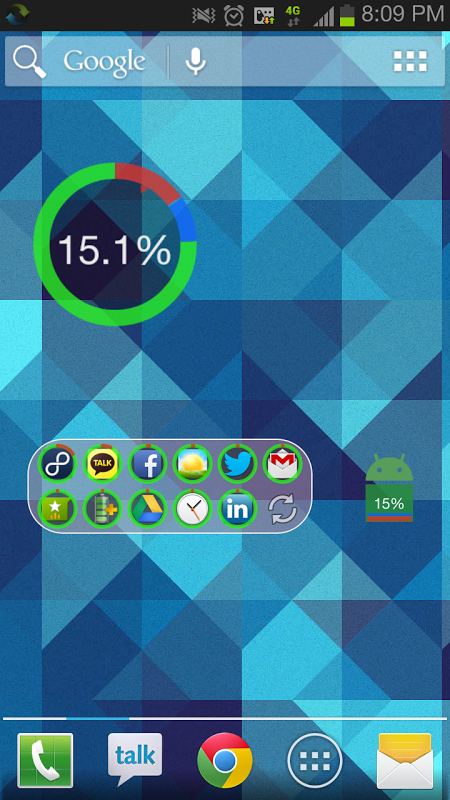
Wakelock Detector FULL PACK unlocks all features (Widgets, Knowledge Base)
Requires ROOT Access in Android 4.4 KitKat or later
=========================================
Ever wondered why your smartphone screen does not turn off automatically when it should have, the screen wakes up all of a sudden or you find your phone battery drained even when you exited apps and turned off the screen? This might be due to wakelock holding apps. ”Wakelock Detector” helps you to detect battery draining apps in your Android phone by checking wakelock usage history. Now you can easily find out what keep your phone awake and drain your battery when it is idle!
“Wakelock” is a mechanism of power management service in Android OS, which can be used to keep CPU awake (Partial wakelock) and keep the screen on(Full wakelock). Applications which use wakelock privilege improperly leads to situations where the CPU or phone screen stays active without user's knowledge and thus causing dramatic battery drain.
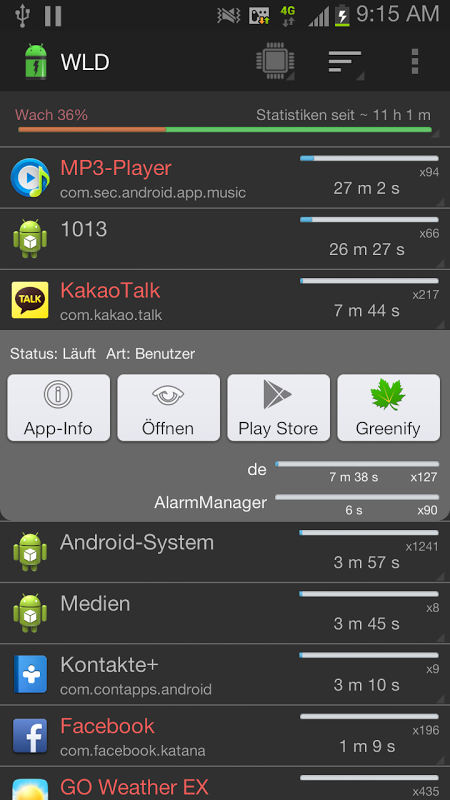
“Wakelock Detector” shows wakelock usage statistics for all applications, which ever held wakelock since boot. By default it displays CPU wakelocks sorting by the longest usage time. Further, you can choose Screen wakelock type to see screen related wakelocks. For instance, if your screen is keeping on even after screen timeout or your screen turns on randomly by itself, then you can choose Screen wakelock type on the top (Brightness icon) to see which apps are using screen wakelock. Furthermore, if you are interested in currently running applications then you can change sorting type to "Active" which shows active running applications on the top. For further details please refer to FAQ inside Settings.
Main features:
# shows both CPU wakelock (Partial wakelock) and Screen(Full wakelock) ;
# merges wakelocks of corresponding app into one expandable view for better user experience;
# currently active running applications are shown in red color;
# allows easy sorting options by Running state , Wakelock time and Alphabetical order;
How to use:
#1 Charge your phone above 90% and unplug cable (or just reboot the phone)
#2 Give it a time (1-2 hours) to accumulate some wakelock usage statistics
#3 Open “Wakelock Detector”
#4 Check the apps on the top, if they show very long wakelock usage time then you found the cause of your battery drain!
#Notice
We are working on improving the performance of the “Wakelock Detector” by adding new features regarding wakelock issues users usually face. We are trying to follow up all your comments. And we know that the application is not ideal yet. We would appreciate if you send us email before giving negative comments in the Play Store. Your feedbacks are always welcome!
* MIUI users - Make sure that battery service is turned on.
#Reviews
XDA - http://www.xda-developers.com/android/defend-your-battery-with-wakelock-detector/
HowToGeek - http://www.howtogeek.com/142654/find-out-which-apps-are-keeping-your-android-awake-with-wakelock-detector/
LifeHacker - http://lifehacker.com/5993706/wakelock-detector-shows-you-the-apps-that-keep-your-phone-awake
DotTech - http://dottech.org/103671/android-review-wakelock-detector/
Temefy - http://temefy.com/defend-your-battery-with-wakelock-detector
Facebook - http://www.facebook.com/wakelockdetector
Wakelock PPT [recommended] - http://goo.gl/7WgGz
</div> <div jsname="WJz9Hc" style="display:none">=========================================
Wakelock للكشف عن كامل PACK يفتح كافة الميزات (الحاجيات، قاعدة المعرفة)
يتطلب الوصول ROOT في أندرويد 4.4 أو في وقت لاحق كيت كات
=========================================
تساءلت يوما لماذا شاشة الهاتف الذكي الخاص بك لا إيقاف تلقائيا عندما ينبغي أن يكون، وشاشة يستيقظ فجأة أو تجد بطارية هاتفك استنزفت حتى عندما كنت خرجت تطبيقات وإيقاف الشاشة؟ قد يكون هذا يرجع إلى wakelock عقد التطبيقات. "Wakelock الكاشف" يساعدك على اكتشاف بطارية استنزاف التطبيقات في الهاتف الروبوت الخاص بك عن طريق فحص wakelock تاريخ استخدام. الآن يمكنك بسهولة معرفة ما إبقاء هاتفك مستيقظا واستنزاف البطارية عندما يكون خاملا!
"Wakelock" هو آلية خدمة إدارة الطاقة في نظام تشغيل الروبوت، والتي يمكن استخدامها للحفاظ على اليقظة وحدة المعالجة المركزية (wakelock جزئي) والحفاظ على الشاشة على (wakelock الكامل). التطبيقات التي تستخدم wakelock امتياز يؤدي بشكل غير صحيح على الحالات التي تبقى وحدة المعالجة المركزية أو الهاتف الشاشة النشطة دون علم المستخدم، وبالتالي التسبب مثيرة استنزاف البطارية.
"Wakelock الكاشف" يظهر wakelock إحصائيات الاستخدام لجميع التطبيقات، التي عقدت من أي وقت مضى منذ wakelock التمهيد. افتراضيا فإنه يعرض wakelocks CPU الترتيب بواسطة أطول وقت الاستخدام. وعلاوة على ذلك، يمكنك اختيار الشاشة نوع wakelock لرؤية wakelocks شاشة ذات الصلة. على سبيل المثال، إذا الشاشة هو الحفاظ على حتى بعد مهلة الشاشة أو يتحول الشاشة على عشوائيا من تلقاء نفسه، ثم يمكنك اختيار شاشة نوع wakelock على رأس (رمز السطوع) لمعرفة التطبيقات التي تستخدم الشاشة wakelock. وعلاوة على ذلك، إذا كنت ترغب في تشغيل التطبيقات حاليا ثم يمكنك تغيير نوع الفرز إلى "نشط" مما يدل على تشغيل التطبيقات النشطة على القمة. لمزيد من التفاصيل يرجى الرجوع إلى أسئلة وأجوبة إعدادات الداخل.
ميزات رئيسية هي:
# يظهر كل من وحدة المعالجة المركزية wakelock (wakelock جزئي) وشاشة (wakelock كاملة)؛
# يدمج wakelocks من التطبيق في طريقة العرض للتوسيع واحد لتجربة أفضل للمستخدم المقابلة؛
يتم عرض # التطبيقات النشطة حاليا تشغيل في اللون الأحمر.
# يسمح خيارات الفرز سهلة من خلال الجري الدولة، والوقت Wakelock والترتيب الأبجدي.
كيفية الاستخدام:
# 1 شحن هاتفك فوق 90٪ وكابل توصيل (أو مجرد إعادة تشغيل الهاتف)
# 2 إعطائها الوقت (1-2 ساعات) لجمع بعض إحصائيات الاستخدام wakelock
# 3 فتح "Wakelock الكاشف"
# 4 تحقق من تطبيقات على القمة، إذا كانت تظهر طويلة جدا wakelock وقت الاستخدام ثم هل وجدت قضية استنزاف البطارية الخاصة بك!
#Notice
نحن نعمل على تحسين أداء "Wakelock الكاشف" من خلال إضافة ميزات جديدة تتعلق المستخدمين القضايا wakelock تواجه عادة. نحن نحاول متابعة جميع تعليقاتكم. ونحن نعلم أن التطبيق ليست مثالية حتى الآن. ونحن نقدر إذا كنت ترسل لنا البريد الإلكتروني قبل اعطاء التعليقات السلبية في سوق Play. ردودكم هي دائما موضع ترحيب!
* المستخدمين MIUI - تأكد من أن يتم تشغيل خدمة البطارية على.
#Reviews
XDA - http://www.xda-developers.com/android/defend-your-battery-with-wakelock-detector/
HowToGeek - http://www.howtogeek.com/142654/find-out-which-apps-are-keeping-your-android-awake-with-wakelock-detector/
يفهكر - http://lifehacker.com/5993706/wakelock-detector-shows-you-the-apps-that-keep-your-phone-awake
DotTech - http://dottech.org/103671/android-review-wakelock-detector/
Temefy - http://temefy.com/defend-your-battery-with-wakelock-detector
الفيسبوك - http://www.facebook.com/wakelockdetector
Wakelock PPT [أوصى] - http://goo.gl/7WgGz</div> <div class="show-more-end">
معلومات إضافية
تاريخ التحديث
2017-10-30الإصدار
2.0.3الحجم
2.03 ميجابايتالمطور
UzumAppsuzumapps@gmail.com
تصنيف المحتوى
Everyoneالحزمة
com.uzumapps.wakelockdetector.fullالتوقيع (MD5)
9413b079e5efab14da0a55a5afaf597e